What Is Hosting?

I remember the first time I tried to make a website live. I had spent weeks building it the design was clean, the content was ready, and I was genuinely proud of what I had put together. Then someone asked me a question I had no answer for: “Where is it actually going to live on the internet?”
That question stopped me cold. I had built the house but had no land to put it on.
That is exactly what hosting is the land your website lives on. And once I understood that, everything about how the internet works started making sense. This guide is what I wish someone had handed me on that day. Whether you are building your first website, launching a business online, or just trying to understand what you are actually paying for every month, this is the honest explanation you need.
What Are The Basic Roles Of Hosting?

At its most fundamental level, hosting solves one problem: making your website accessible to anyone in the world, at any time, without you having to keep a computer running 24 hours a day.
When someone types your web address into their browser, their device sends a request across the internet asking for your website’s files. Those files your HTML, your images, your videos, your databases need to be stored somewhere that is always online, always fast, and always reachable. That somewhere is a hosting server.
Think of it this way. Your website is like a book. Writing the book is the design and development work. Hosting is the library shelf where the book sits permanently available for anyone who wants to read it. Without the shelf, the book exists but nobody can find it.
The basic roles hosting performs every single day:
- Storage keeping all your website files safe and organised on a server
- Delivery sending those files to a visitor’s browser within milliseconds of their request
- Availability keeping your site accessible 24 hours a day, 7 days a week, 365 days a year
- Security protecting your files from unauthorised access, malware, and data breaches
- Resource management allocating the processing power, memory, and bandwidth your site needs to run smoothly
Without hosting performing all five of these roles simultaneously, your website simply does not exist online.
Key Functions of Hosting Services
Modern hosting is not just about storing files. The best hosting providers function more like a full infrastructure team working in the background so you never have to think about the technical side of keeping your site running.
Server Management
The most valuable thing a hosting provider does is manage the physical and software infrastructure you never see. This includes:
- Regular server software updates and security patches
- Hardware maintenance and replacement
- Performance optimization to ensure fast load times
- Network management to keep your site connected to the internet reliably
When I first moved from a cheap shared host to a quality managed hosting provider, the difference was immediate. Page load times dropped. Support responses were faster. And I stopped spending evenings troubleshooting server errors I did not understand.
Domain Integration
Most hosting providers offer domain registration alongside hosting, allowing you to manage your domain name and your hosting account in one place. This matters more than it sounds having your domain and hosting under the same account simplifies DNS management significantly and reduces the risk of configuration errors that can take your site offline.
Multi-Site Management
Quality hosting accounts allow you to host multiple websites under a single subscription. For freelancers managing client sites, bloggers running several projects, or small agencies, this is a practical feature that reduces both cost and administrative complexity.
Automated Backups
Here is something I learned the hard way. A website without regular backups is a website waiting for a disaster. A hosting provider that performs daily automated backups and stores them off-server is not a luxury it is essential protection. If your site is ever hacked, corrupted, or accidentally broken during an update, a recent backup is the difference between a one-hour recovery and starting from scratch.
The History And Evolution Of Hosting

Understanding where hosting started makes it easier to understand why so many different types exist today and which one actually fits your needs.
In the early days of the internet the mid-1990s hosting was genuinely primitive. Websites were static collections of HTML files and images with no dynamic functionality. To host a website, you needed either a university network connection or a direct arrangement with one of the handful of companies that operated servers.
As the internet grew commercially in the late 1990s, shared hosting emerged as the first accessible option for individuals and small businesses. Multiple websites sharing a single server made hosting affordable for the first time but it also introduced the performance trade-offs that still exist in shared hosting today.
The 2000s brought dedicated servers for businesses that needed guaranteed performance, followed by the development of Virtual Private Servers a technology that gave users the benefits of a dedicated environment at a fraction of the cost.
Then cloud hosting changed everything. Instead of one website depending entirely on one physical server, cloud hosting distributes your site across a network of servers. If one server has a problem, another picks up the load instantly. This shift brought the kind of reliability and scalability that previously only large enterprises could afford within reach of anyone.
Hosting Types

Choosing the right type of hosting is one of the most consequential decisions you will make for your website. Each type represents a different trade-off between cost, performance, control, and technical complexity.
- Shared Hosting
- Dedicated Hosting
- Virtual Private Server (VPS)
Shared Hosting

Shared hosting puts your website on a server alongside dozens or hundreds of other websites. All of those sites share the same pool of resources the same CPU, the same memory, the same bandwidth.
Who it is genuinely right for:
- Personal blogs and portfolio sites
- Small business websites with moderate traffic
- Anyone launching their first website who wants to minimise upfront cost
- Side projects and passion projects where budget is the primary constraint
The real limitation to understand: if another site on your shared server experiences a sudden traffic spike, it can slow down your site. This is called the “noisy neighbour” problem and it is the main reason shared hosting is not suitable for business-critical sites where performance consistency matters.
Dedicated Hosting

Dedicated hosting gives you an entire physical server exclusively for your website. No sharing. No noisy neighbours. Every resource on that server is yours.
The genuine advantages:
- Maximum performance and reliability
- Complete control over server configuration
- Highest level of security no other sites on your server means no cross-contamination risk
- Suitable for high-traffic sites that need consistent performance under load
The honest trade-off: dedicated hosting is expensive typically starting at several hundred dollars per month and requires technical knowledge to manage unless you opt for a managed dedicated plan where the provider handles server administration for you.
Virtual Private Server (VPS)

VPS hosting is where most growing websites eventually land, and for good reason. A single physical server is divided using virtualization technology into multiple isolated virtual environments. Your VPS has guaranteed resources a specific allocation of CPU, memory, and storage that are not shared with other users even though the physical hardware is.
Why VPS is the right choice for most serious websites:
- Better performance and stability than shared hosting at a reasonable price
- Root access gives you full control over your server environment
- Scalable you can increase your resource allocation as your site grows without migrating to a new server
- More cost-effective than dedicated hosting for sites that do not need an entire physical server
A practical example: an e-commerce site processing a few hundred orders per day, a news blog generating 50,000 monthly visits, or a SaaS application with a growing user base all of these outgrow shared hosting quickly and find their natural home on a VPS.
Different Types Of Hosting
Beyond the three core infrastructure types, hosting comes in several specialized forms designed for specific use cases.
WordPress Hosting is optimized specifically for WordPress sites. The server configuration, caching systems, and security measures are all tuned for WordPress performance. For anyone running a WordPress site which is a significant portion of the internet managed WordPress hosting eliminates most of the technical overhead of keeping a WordPress installation fast, secure, and updated.
Cloud Hosting distributes your site across multiple interconnected servers rather than a single machine. The practical benefit is resilience if one server in the network fails, others immediately compensate. Cloud hosting also scales dynamically, which means a sudden traffic spike does not bring your site down.
Reseller Hosting allows individuals or agencies to purchase hosting resources in bulk and resell them to clients under their own brand. For web designers and developers who manage client sites, reseller hosting creates a recurring revenue stream while centralizing site management.
Email Hosting is a hosting service specifically for email infrastructure. While most web hosting plans include basic email functionality, dedicated email hosting provides better deliverability, larger storage, and more robust spam protection for businesses that rely heavily on email communication.
Free Or Paid Hosting?

This is one of the most common questions from people launching their first website and it deserves an honest answer rather than a sales pitch.
Free hosting exists. Platforms like WordPress.com, Wix, and various other services offer genuinely free tiers. For someone who wants to experiment with blogging or build a personal page with no budget, these options are legitimate starting points.
But here is what free hosting actually costs you:
- Your domain free hosting almost always means a subdomain on the provider’s domain, like yourname.wordpress.com instead of yourname.com. This undermines your brand credibility immediately.
- Advertisements many free hosting providers display their own ads on your site without your control. You are essentially renting space in exchange for your visitors seeing their promotions.
- Performance free tiers receive the lowest resource allocation. When traffic increases, free-hosted sites are the first to slow down.
- Support free hosting typically means no customer support or severely limited support options.
- Data ownership some free platforms have terms of service that give them broad rights over content hosted on their infrastructure.
Paid hosting starts at a few dollars per month for shared plans. For any website that represents a real project a business, a professional blog, a portfolio you are using to attract clients the investment in paid hosting pays for itself almost immediately in credibility, performance, and control.
Paid hosting is preferable especially when dealing with more serious projects. It is a reliable and able to scale and succeed online with any best hosting service.
The Need For Hosting Services

The need for hosting goes beyond just having a website. In 2026, your hosting infrastructure directly affects your search engine rankings, your customer experience, and your business credibility.
Search engines use page load speed as a ranking signal. A slow website often caused by poor hosting does not just frustrate visitors. It actively pushes you down in search results. Studies consistently show that a one-second delay in page load time can reduce conversions by 7%. For an e-commerce site generating $10,000 per month, that one second of slowness costs $700 every month.
The hosting needs that most people underestimate:
- Uptime reliability a hosting provider that offers 99.9% uptime sounds impressive until you realise that 0.1% downtime equals over 8 hours offline per year. For a business taking online orders, 8 hours of downtime is a serious revenue loss.
- Geographic server location the physical location of your hosting server affects load times for your visitors. A server in Europe serving primarily North American visitors will be slower than a server located in North America. Quality hosting providers offer Content Delivery Networks that distribute your content globally to reduce this latency.
- SSL certificates modern hosting should include a free SSL certificate as standard. Without SSL, browsers display a “Not Secure” warning to your visitors an immediate trust killer for any website, particularly those handling transactions or personal data.
Hosting Business Impact

Hosting services are an essential element for running a business. Entertainment is crucial in the success of business. A good hosting service is one on which your site will be accessible at all times to the customers.
The hosting decision you make has a direct, measurable impact on your business outcomes. This is not a technical consideration to delegate and forget. It is a business decision that affects revenue, customer trust, and growth capacity.
Downtime Costs Real Money
Every minute your website is offline is a minute potential customers cannot find you, cannot buy from you, and cannot contact you. A restaurant whose website goes down on a Friday evening loses reservation enquiries. An e-commerce store whose site crashes during a promotional campaign loses the entire return on that campaign investment.
Quality hosting providers publish their uptime guarantees and back them with service credits if they fail to meet them. Before choosing any hosting provider, check their historical uptime record not just their guarantee. Third-party monitoring services publish this data for most major providers.
Scalability Determines Your Growth Ceiling
A website that cannot handle increased traffic is a business that cannot handle growth. The hosting infrastructure you choose today either supports your expansion or becomes the ceiling that limits it.
The practical approach is to choose a hosting provider that offers a clear upgrade path. Starting on shared hosting and knowing you can move to VPS, and then to dedicated or cloud hosting, without changing providers means your growth does not require a disruptive migration at the worst possible moment.
Hosting And Website Management

Your hosting provider and your website management are more connected than most people realise. The quality of your hosting directly determines the tools and capabilities available to you for managing your site day to day.
A quality hosting control panel cPanel, Plesk, or a proprietary alternative gives you straightforward access to:
- File management uploading, organizing, and editing your website files
- Database management creating and managing the databases your site depends on
- Email account management setting up and configuring professional email addresses on your domain
- DNS management controlling how your domain name connects to your hosting server
- One-click installations deploying WordPress, e-commerce platforms, and other applications in minutes rather than hours
The difference between a well-designed control panel and a confusing one is not just convenience. It is the difference between managing your website confidently and dreading every technical task.
The Importance Of Hosting In Data Management

Your hosting provider is the custodian of your data. Every article you publish, every customer record you collect, every transaction your site processes all of it lives on your hosting server.
This responsibility should shape how you evaluate hosting providers.
The data management questions to ask before choosing a provider:
- Where are your servers physically located? Data sovereignty laws vary by country. If your customers are in the European Union, GDPR compliance requires careful consideration of where their data is stored and processed.
- How frequently are backups performed? Daily backups are the minimum acceptable standard. The best providers offer hourly or real-time backups for business-critical sites.
- How are backups stored? Backups stored on the same server as your site are not true backups. Off-site or off-server backup storage ensures that a server failure does not take your site and its backup down simultaneously.
- What encryption is applied to stored data? At-rest encryption protects your data from being read even if someone gains unauthorized physical access to the server hardware.
Points to Consider When Choosing A Hosting Service

After reviewing and working with multiple hosting setups, these are the factors that consistently separate a good hosting decision from one that causes problems down the road.
Performance is the starting point. Look for servers with SSD storage rather than traditional hard drives SSDs are significantly faster and directly improve your page load times. Check whether the provider uses a CDN and what their average server response time is.
Uptime guarantee should be 99.9% or higher, backed by a compensation policy that gives you service credits if they fail to meet it.
Customer support quality matters enormously when something goes wrong. A hosting provider with 24/7 live chat or phone support is meaningfully more valuable than one that only offers email tickets with 48-hour response times. Before signing up, test their support with a question the speed and quality of that response tells you everything you need to know.
Scalability means a clear, affordable upgrade path from your current plan to higher-tier plans as your needs grow. Ask specifically what the process is for upgrading and whether it involves downtime.
Security features should include SSL certificates, malware scanning, DDoS protection, and a web application firewall as standard not as paid add-ons.
Pricing transparency is a non-negotiable. Many hosting providers advertise a low introductory price that multiplies significantly on renewal. Read the renewal pricing before you commit not just the sign-up offer.
Features of Modern Hosting Services

The hosting industry has evolved to the point where quality providers offer a comprehensive ecosystem of features rather than just server space. Understanding what is available helps you choose a provider whose feature set matches your actual needs.
Setup and migration services domain registration, operating system installation, and professional site migration from your current host. A provider that handles migration properly can move an established site with zero downtime.
Security services SSL certificates, malware scanning and removal, spam filtering, firewall configuration, and intrusion detection. These are not optional extras. They are the baseline of a responsible hosting environment.
Performance services server-side caching, CDN integration, image optimization, and database query optimization. These features directly affect your page load speed and therefore your search rankings and conversion rates.
Monitoring and operational support uptime monitoring with instant alerts, automated load balancing that distributes traffic across resources to prevent overload, and disaster recovery planning for business continuity.
Services Related To Implementation And Construction
One of the major features of hosting services is the comprehensive support they provide from installation to construction. Services such as domain acquisition, multi-domain support, installation of the desired operating system (OS), and data and system migration support are generally provided. These services play an important role in smoothly installing and efficiently building a hosting environment. Data and system migration, in particular, can sometimes be a complex and difficult process, so this type of professional support is extremely valuable.
Security Measures Services

Hosting services also play an important role in supporting security measures. This includes virus checks, spam protection, firewall configuration, and providing SSL server certificates. These tools and services are essential to keeping your hosting environment secure. Providing an SSL certificate, in particular, is crucial for strengthening the protection of user data and ensuring the reliability of your site.
Services To Reduce The Burden On Operations Managers
Hosting services also offer features to reduce the burden on operations managers. These include manned monitoring, load balancing, BCP (business continuity planning) measures, tamper detection, and services with root privileges. These services streamline server operation and maintenance, ensuring smooth business continuity even in the event of a disaster. Services such as manned monitoring and tamper detection, in particular, play an important role in maintaining security.
Connection And Line Services
Finally, connectivity and line services, such as VPN connections and dedicated lines, are also important features. These ensure a reliable internet connection and are crucial for maximizing the performance of hosting services. All of these services and features are designed to provide users with a secure and efficient online environment. Hosting services are an appropriate solution when setting up and managing a server is difficult. Understanding the features and services offered by each hosting service will help you choose the best one for your business or project.
Hosting vs. Cloud Services

The distinction between traditional hosting and cloud services is one of the most commonly misunderstood concepts in web infrastructure and getting it wrong can lead to paying for the wrong solution.
Traditional hosting allocates a fixed set of resources a specific amount of storage, memory, and processing power to your website. Those resources are yours for the duration of your plan whether you use all of them or none of them.
Cloud services allocate resources dynamically. Your site draws on a shared pool of computing power across multiple interconnected servers and you are billed for what you actually consume. When traffic spikes, cloud infrastructure scales up automatically. When traffic drops, it scales back down.
The practical difference in three scenarios:
- A small business website with consistent traffic traditional shared or VPS hosting is almost certainly more cost-effective and straightforward
- An e-commerce site with unpredictable traffic spikes cloud hosting’s dynamic scaling prevents performance issues during promotional events or unexpected viral traffic
- A high-growth startup with rapidly increasing user numbers cloud infrastructure scales with growth without requiring manual server upgrades
The security model also differs. Traditional hosting gives you direct control over your security configuration which requires technical knowledge but also gives you complete visibility. Cloud security is largely managed at the provider level, which simplifies the user experience but requires trusting the provider’s security practices and compliance standards.
Hosting vs. Cloud Cost Comparison

Hosting services are often charged in fixed prices depending on the resources allocated. This makes budgeting easier.
Cloud computing is a pay per use approach. People are only charged on the resources they consume.
Although cloud services may be cost effective, the usage may also be high, which results into added costs.
Hosting vs. Cloud Performance Comparison
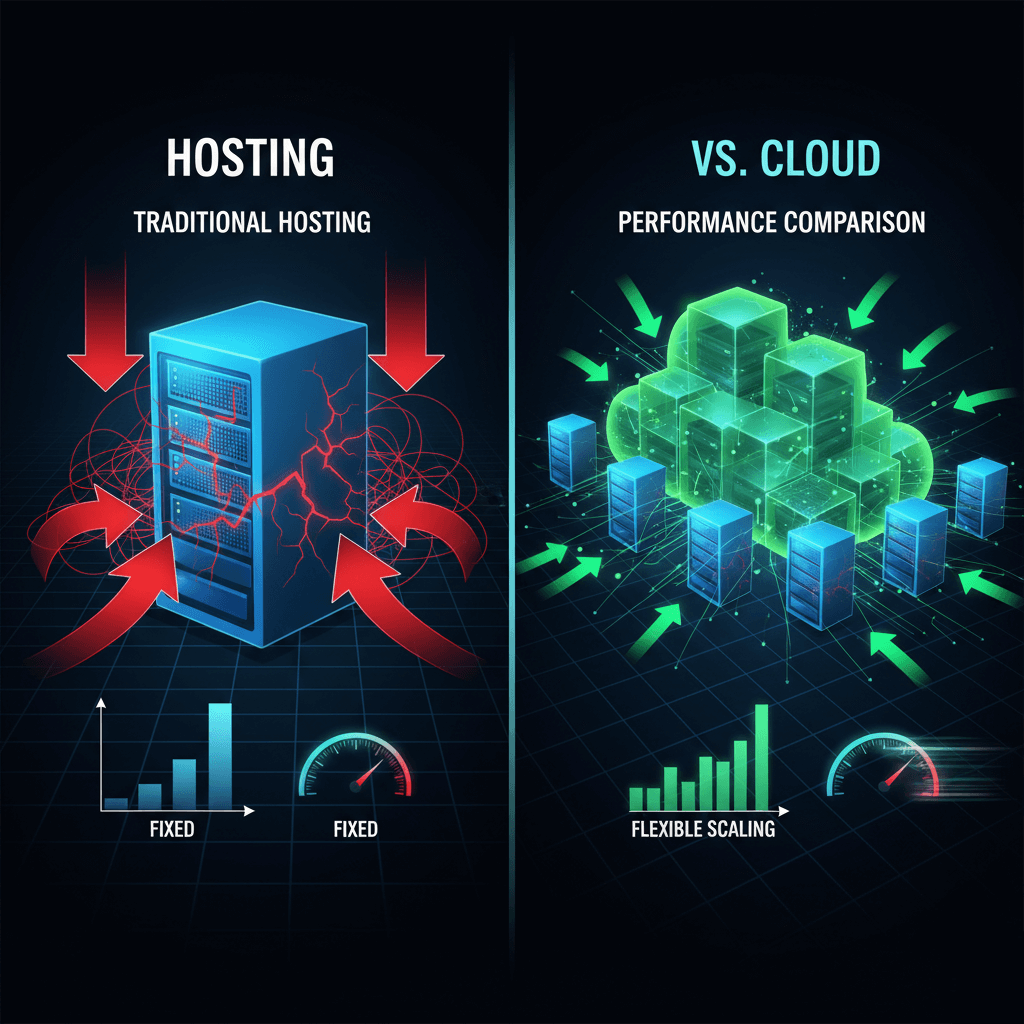
The reason is that, hosting performance is dependent on server specs. At some point when traffic is congested, it can reduce performance.
By using cloud services, one is able to scale resources immediately making sure that resources continue to deliver performance even at peak times.
Hosting vs. Cloud Security Comparison

Under conventional hosting, users have control over security configuration. This involved technical knowledge.
The security in cloud services occurs at the provider level. This eases the workload on the users but demands trust of the provider.
The Future Of Hosting And Expected Developments

Hosting is evolving faster than at any point in its history, driven primarily by artificial intelligence and the continued expansion of edge computing.
AI is beginning to transform hosting infrastructure in practical ways. Predictive scaling uses machine learning to anticipate traffic increases before they happen and pre-allocate resources accordingly eliminating the brief performance dip that even cloud hosting experiences during sudden traffic spikes. Automated security systems use AI to identify and respond to threats in real time, often neutralizing attacks before a human security analyst would even be aware of them.
Edge computing is bringing hosting infrastructure physically closer to end users. Rather than all requests travelling to a centralized data center, edge nodes distributed globally process requests at the point closest to the user. For latency-sensitive applications real-time collaboration tools, video streaming, interactive web applications edge hosting represents a meaningful performance improvement over centralized cloud infrastructure.
The hosting industry itself is consolidating. Larger providers are acquiring smaller ones, which tends to improve infrastructure investment but can affect customer service quality and pricing flexibility. Independent providers who specialize in specific niches managed WordPress hosting, developer-focused VPS, privacy-focused hosting for journalists and activists continue to carve out strong positions by serving specific needs better than generalist providers.
What remains constant through all of this evolution is the fundamental purpose of hosting: making your digital presence reliably accessible to the people who need it. The technology changes. That mission does not.
1. Can cheap shared hosting cause heavy WordPress page builders like Elementor to crash?
Yes, this happens a lot. When you use a cheap, basic hosting plan, it comes with very limited memory. Because of this, doing heavy tasks like updating Elementor or running too many plugins at the same time overloads the server. This causes WordPress to crash, showing a “Critical Error” message or just a blank white screen.
While working with clients at CubeCod Technologies, I found the quickest way to fix this manually:
Log into your cPanel and open your website files.
Find and open the file named wp-config.php.
Right before the line that says “stop editing”, add this single line:
define(‘WP_MEMORY_LIMIT’, ‘256M’);
That’s it! This gives your website more breathing room, and the error will disappear.
2. Why does my WordPress site feel fast on a local server but slow on live web hosting?
When you work on a website on your own computer (a local server), it runs directly on your machine’s hardware. This means it goes as fast as your computer can handle.
However, when you move that exact same website to a cheap, shared live hosting plan, your site is forced to share space with thousands of other websites on the same crowded server. This heavily slows down the time it takes for the server to even start loading your page (known as TTFB).
If your website works fast on your computer but crawls at a snail’s pace once it’s live, the problem isn’t with your website’s database it’s simply that your hosting company is choking your server resources.