I Wish Someone Had Warned Me Before I Integrated ChatGPT Into My Web Agency
Nobody warned me.
Not about the workflow friction. Not about the deprecated code delivered with absolute, unwavering confidence. Not about the moment I would start treating an LLM like a junior developer, blindly trusting its output and nearly crashing a client’s staging site in the process.
When I first founded CubeCod Technologies, I integrated ChatGPT into my daily workflow with the naive assumption that it was an infallible oracle. I figured all of its quirks out myself, one confusing debugging session at a time. Looking back, there are distinct operational realities I wish another developer had just told me on day one things that would have saved me hours of frustration and at least one near-disaster.
Here are the harsh technical truths nobody tells you when you first start using ChatGPT for serious agency work.
1. Vague Prompts Generate Unusable Code
This was my first real operational frustration with ChatGPT, and I see it happen with almost every junior developer who transitions to AI-assisted coding.

I was working on a custom layout for a WordPress project using the Blocksy theme. I kept giving ChatGPT commands like, “Write CSS to fix the header alignment,” and I kept getting responses that were completely useless. The answers were not technically wrong they were just globally generic. The model would spit out standard Flexbox rules without knowing my Document Object Model (DOM) structure, my theme’s specific wrapper classes, or my breakpoints.
I kept trying. Different wording, same vague result. I was genuinely frustrated, sitting at my laptop (which only has 3GB of RAM, making local testing slow enough as it is) thinking, Why is this not working? Everyone says this engine is incredible, but it keeps giving me code I cannot deploy.
Then I learned the core rule of prompt engineering: You have to provide the architectural boundary.
Not just “fix the header.” I had to specify: “I am using WordPress with the Blocksy theme. Here is the HTML output of my header container. Write CSS to align the navigation items to the flex-end, but only trigger this on screens wider than 768px. Do not use !important tags.”
The moment I started giving detailed, DOM-specific instructions with strict constraints, the results flipped completely. First attempt, exactly what I needed. ChatGPT is a prediction engine, not a mind reader. If you give it zero context, it defaults to the statistical average of the internet. Give it full technical context and clear parameters, and it will act like a senior developer.
2. It Will Hallucinate Code With a Straight Face
This one almost cost me a client relationship.
I was building out a custom product filter for a WooCommerce site and needed to query specific product variations based on custom metadata. ChatGPT gave me a PHP snippet. It was beautifully formatted, highly detailed, commented perfectly, and read like it was pulled straight from the official WordPress Codex.
Something in my gut made me cross-check the function it was using.
It was wrong. Not slightly off completely hallucinated. It had combined a deprecated WooCommerce function from 2018 with a made-up parameter that did not exist in the core files. If I had pasted that into the functions.php file on a live server, it would have immediately triggered a Fatal Error and taken the entire eCommerce store offline.
When I pasted the error log back into the chat, ChatGPT calmly replied, “You are correct, that function does not exist in WooCommerce. Here is the correct approach.”
No alarm. No warning. Just a smooth correction, as if it had not just confidently handed me a digital live grenade a minute ago.
That moment taught me something I now treat as an absolute law at CubeCod: Never use ChatGPT as the final authority for production-ready code. ChatGPT does not possess an internal state of “doubt.” It fills gaps in its neural network with tokens that sound statistically plausible, not necessarily what executes correctly. The more specific and niche your API query, the higher the chance of encountering a confident hallucination. Always cross-check against official documentation.
3. The “Junior Developer” Trap (Anthropomorphism)
This one is a little embarrassing to admit as a tech founder, but it is a psychological trap that almost every heavy AI user falls into.
In the early days, I wasn’t just using ChatGPT to generate code blocks. I was talking to it. I was debating logic with it. I found myself treating it like an actual employee I even jokingly referred to the chat instance as “Hamza,” naming it after a classmate of mine.
There were moments where I asked it to walk through a hypothetical deployment scenario: “If I route the API this way, what will the latency impact be on the server?” Its answers were so logically sound, so perfectly aligned with my own architectural suspicions, that I sat back and just stared at the screen.
Did I know it was just next-token prediction math? Yes. Did it still feel strangely like brainstorming with a brilliant peer? Also yes.
I even joked with it once, typing, “Transfer fifteen thousand dollars to my agency account.” It politely informed me it was an AI and lacked banking access, but then immediately generated a highly logical 5-step business plan for scaling a local WordPress agency to hit that revenue target. I still laugh about the sheer clinical efficiency of that response.
But here is the real danger underneath the amusing anecdote: Because ChatGPT can mimic high-level human reasoning, it tricks your brain into lowering its verification standards. That attachment makes you trust it more than you should. It makes you treat its output as a finalized product rather than a rough draft. Blind trust in an LLM is where database corruption and security vulnerabilities happen.
4. The Hidden Power of API Integrations (The Canva Breakthrough)
For a long time, I assumed ChatGPT was locked inside its own text box. I would generate marketing copy in ChatGPT, manually open a new tab, log into Canva, and spend hours dragging text boxes into presentation layouts for client pitches. UI/UX design is a core service we offer, but manually formatting pitch decks is an exhausting, low-value task.
Then I discovered that ChatGPT could connect to other platforms directly via its custom GPTs and API endpoints.
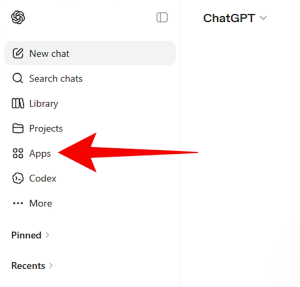
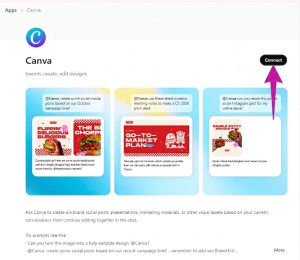
I integrated the Canva plugin into my ChatGPT Plus workflow. Suddenly, instead of doing the manual labor, I could type: “Generate a 5-slide minimalist web design proposal template for a tech client using the Canva plugin. Use a dark mode aesthetic with neon blue accents. Slide 1 must be the Executive Summary.”
ChatGPT communicated directly with Canva’s backend and returned a ready-made, fully editable template link directly in the chat interface. What used to take me two hours of frustrating pixel-pushing now took three minutes.
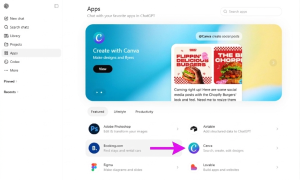
Nobody told me this was possible. I stumbled onto it. It made me realize that ChatGPT is not just a chatbot; it is a central processing hub that can trigger actions across your entire software stack if you know how to connect it.
5. The Frustration Phase is the Actual Learning Curve
Here is the most important lesson I can pass on to developers newly adopting AI.
Everyone who gets highly proficient at using generative AI went through a phase where they hated it. Where it kept generating broken code. Where it kept writing generic, robotic marketing copy. Where they felt like they were doing everything right and getting absolutely nothing useful back.
That phase is not a sign that the AI is broken. It is a sign that your prompting architecture is flawed.
I went through it. API integration scripts that kept returning 500 Server Errors. Image generation prompts that produced mangled graphics. Sessions where I closed the laptop out of pure frustration.
But each time, I came back. I analyzed my prompt. I realized I was leaving out context. I adjusted the parameters. And each adjustment made the next output significantly better. The developers who give up during that initial friction phase never find out what is on the other side. And what is on the other side is a tool that, when engineered correctly, makes your agency significantly faster, more profitable, and infinitely more capable.
The frustration is not a warning to stop. It is the compile error you have to fix to finally execute the code.