How to Create Consistent 3D AI Cartoon Videos With Dialogue (Full Prompt Workflow)
Making 3D animated videos used to require a massive budget. You needed scriptwriters, 3D riggers, voice actors, and rendering farms.
Recently, a client approached my agency, CubeCod Technologies, wanting a Pixar-style 3D animated promotional series for social media. They wanted high-quality characters and synced dialogues, but they did not have a $10,000 animation budget.
Instead of turning the client away, I engineered a complete AI production pipeline. Today, you don’t need to know how to use complex software like Maya or Blender. You just need to know how to structure your AI prompts.
The biggest problem beginners face with AI video is character consistency. In scene one, the character looks like a 20-year-old; by scene three, they look 40. In this guide, I will show you my exact 5-step blueprint for locking character consistency and generating a complete 3D animated video with dialogue using just two free tools: ChatGPT (for script and prompts) and Flow AI (for rendering and editing).
Step 1: Generate the Core Story
Everything starts with a prompt. You need to give the AI a clear, engaging narrative. Open ChatGPT or Claude and use this prompt to generate your foundation:
char dost aik sath black city car main road trip k lia niklty hain rastay main bht fun krtay hain mazay krty hain or kabhi hotel or dhabay pr chai peeny k lia bhi ruktay hain or do din bad yeh log apna amazing masti say bhara road trip complete kr lety hain or waps aa jaty hain iss concept par proper paragraph forms mai script tayyar karo for a 1-2 minutes video
Now, break the story down scene by scene.Step 2: The Secret to Character Consistency (The Angle Collage)
Here is where 99% of beginners make a fatal mistake. They generate a single front-facing image of their character and try to animate it. When the AI tries to guess what the character looks like from the side, the face completely changes.
The Golden Rule: You must generate a Character Reference Collage showing the front, side, and 3/4 angles.
Use these precise prompts in ChatGPT to generate the visual descriptions for our four road-trip friends:
Now, give me detailed descriptions of the four friend characters from this story in a Disney-Pixar-style 3D cartoon look. Include their appearance, face, hair, clothes, body type, colors, personality, and other important details.CHARACTER IMAGE PROMPTS:
Character 1 – Taimoor (Driver)
CHARACTER IMAGE PROMPT
Taimoor is a 24-year-old young man with a medium athletic build and a confident personality. He has short, neatly styled black hair with a slight side fade, expressive dark brown eyes, thick eyebrows, and a warm smile. His face is clean-shaven with a slightly defined jawline. He wears a black casual hoodie over a white t-shirt, dark blue jeans, and clean white sneakers. On his left wrist, he wears a modern black smartwatch. He is usually the one driving the black Honda City and always appears calm, responsible, and cheerful. Disney Pixar style, ultra-detailed 3D cartoon, soft rounded facial features, expressive eyes, realistic fabric textures, cinematic lighting, high-quality global illumination.NEGATIVE PROMPT:
anime, low poly, childish cartoon, exaggerated proportions, extra fingers, bad anatomy, blurry face, plastic skin, ugly, distorted eyes, unrealistic smile
Character 2 – Bilal (Funny Friend)
CHARACTER IMAGE PROMPT
Bilal is a 23-year-old energetic young man with a slightly chubby build and a constantly smiling face. He has messy dark brown hair, large expressive brown eyes, thick eyebrows, and a cheerful grin that makes everyone laugh. He wears an olive green bomber jacket over a yellow t-shirt, black jeans, and sporty white shoes. He always carries a DSLR camera hanging around his neck because he loves capturing memories. His personality is playful, humorous, and full of positive energy. Disney Pixar style, highly expressive face, vibrant colors, premium 3D rendering, soft cinematic lighting, realistic clothing folds, friendly proportions.NEGATIVE PROMPT:
anime, low poly, muscular monster, unrealistic bodybuilder, ugly face, distorted proportions, blurry, extra limbs
Character 3 – Burhan (Adventure Lover)
CHARACTER IMAGE PROMPT
Burhan is a 25-year-old tall and fit young man with an adventurous personality. He has slightly long wavy black hair, light stubble, sharp eyebrows, and confident brown eyes. He wears a red and black checkered shirt over a grey t-shirt, dark cargo pants, brown hiking boots, and a small outdoor backpack. Around his neck hangs a pair of sunglasses which he often wears during sunny drives. He enjoys exploring nature and discovering scenic locations. Disney Pixar style, stylized yet realistic anatomy, rich clothing textures, expressive facial animation, cinematic outdoor lighting, ultra-detailed 3D cartoon quality.Character 4 – Ammar (Relaxed Friend)
CHARACTER IMAGE PROMPT
Ammar is a 24-year-old slim young man with a relaxed and friendly personality. He has short curly black hair, soft brown eyes, a light beard, and a gentle smile. He wears a sky-blue denim jacket over a white t-shirt, beige chinos, and comfortable grey sneakers. He always carries a reusable travel mug and enjoys sipping tea while watching beautiful landscapes. He is calm, thoughtful, and always appreciates peaceful moments during the trip. Disney Pixar style, premium-quality 3D cartoon character, soft rounded facial features, realistic hair strands, expressive eyes, cinematic rendering, detailed fabric materials, warm natural lighting.Group Consistency
Four young male friends, ages between 23 and 25, Disney Pixar-inspired 3D cartoon style, stylized realistic proportions, expressive faces, large animated eyes, premium-quality character design, ultra-detailed skin and clothing textures, cinematic global illumination, ray-traced lighting, vibrant color palette, consistent facial features throughout all scenes, family-friendly appearance, realistic body proportions, natural poses, high-quality animated movie look, adventure road trip theme.But here beginners make a very big mistake. They start making videos of the girl and boy using the same image. This can change the look of these characters in every scene.
So remember a golden rule here. Make sure to make images from the front left and right angles of your boy and girl. This will make the AI characters better and their consistency will be maintained in the entire video.
Now, to lock their consistency, we ask the AI to generate a Collage Prompt for each character:
CHARACTER 1 COLLAGE – Taimoor (Driver)
Character Prompt
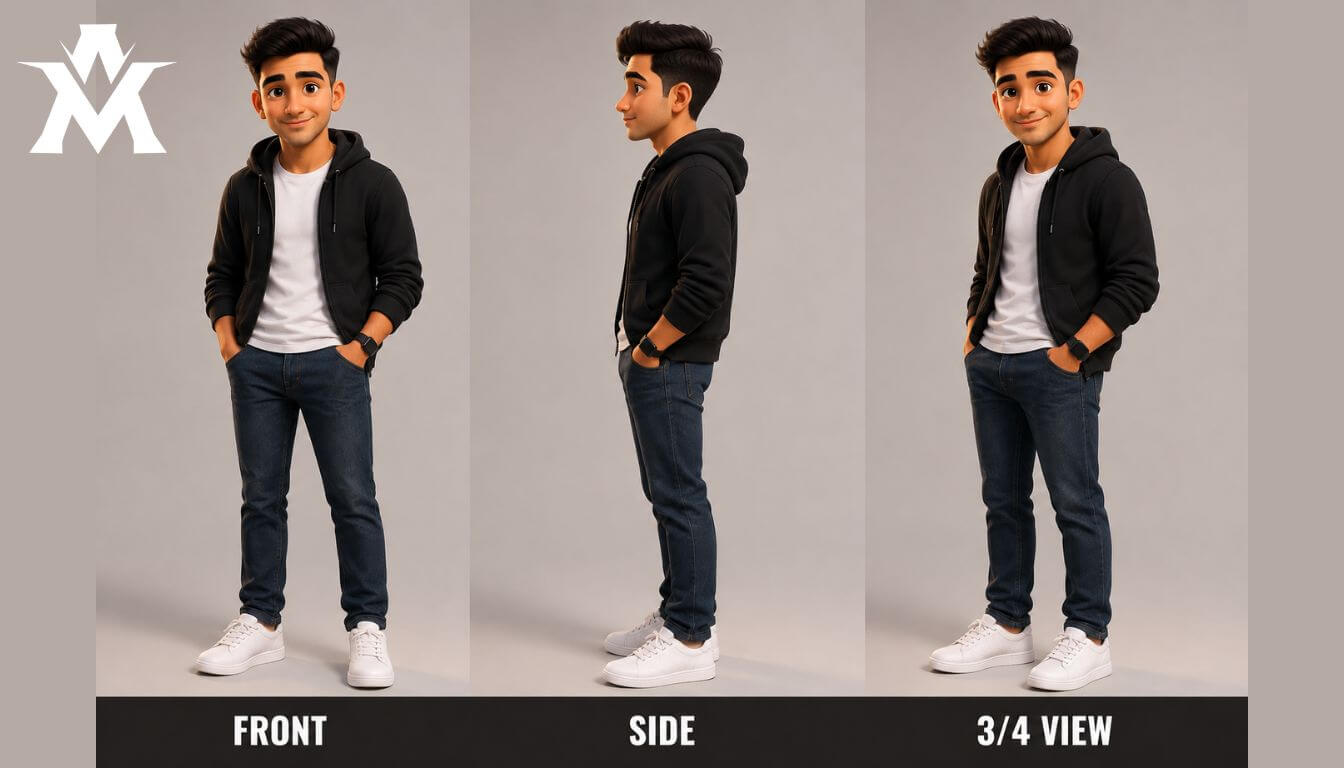
Prompt:
Create a character reference collage of Taimoor. Display the character in three perfectly consistent poses arranged horizontally: Front View, Side View, and 3/4 View. Maintain identical facial features, hairstyle, clothing, colors, body proportions, and expression across all three views. At the bottom, place matching bold labels reading "FRONT", "SIDE", and "3/4 VIEW" beneath each corresponding pose. Use soft, professional animation studio lighting, global illumination, ambient occlusion, physically based rendering (PBR), and Unreal Engine 5 quality. Ensure the character design remains highly consistent and accurate across all three angles, with clean details, cinematic quality, and a polished 3D animated-film appearance.CHARACTER 2 COLLAGE – Bilal (Funny Friend)
Character Prompt
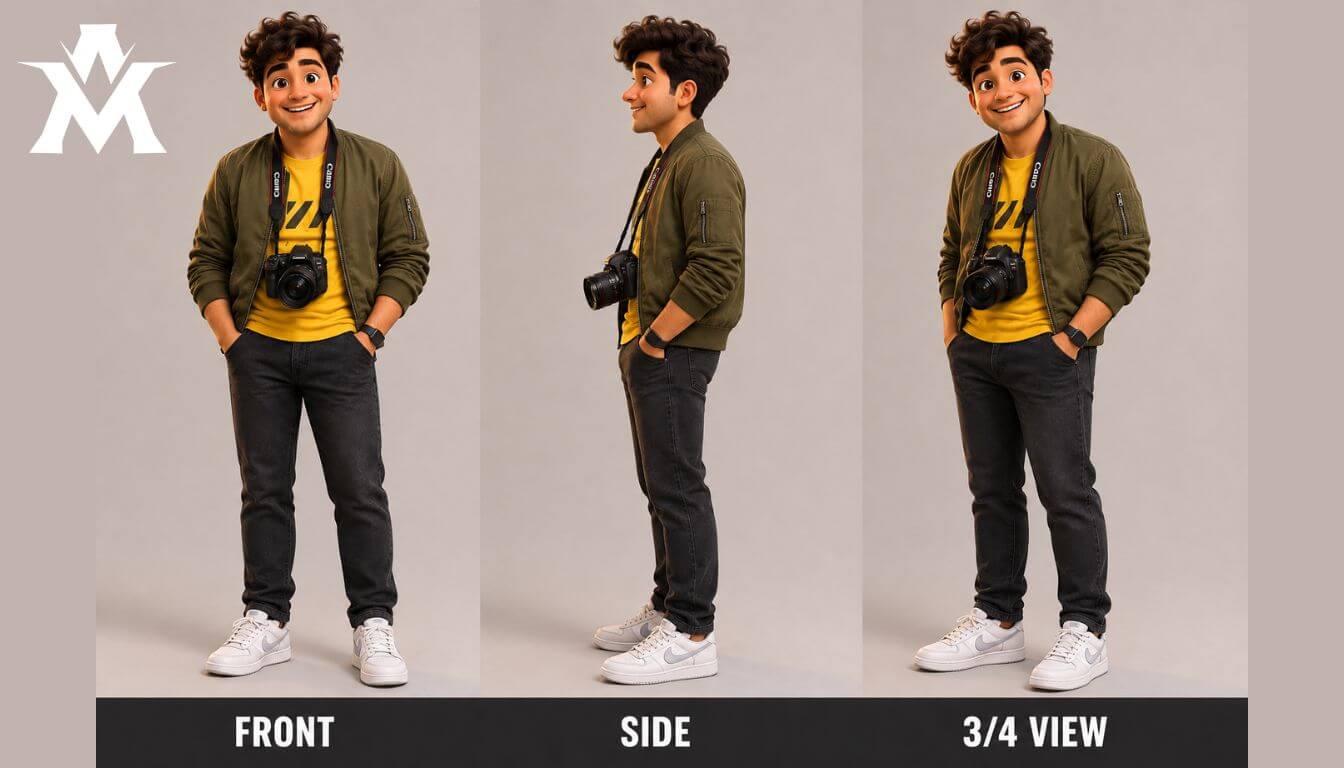
Prompt:
Create a character reference collage of Bilal. Display the character in three perfectly consistent poses arranged horizontally: Front View, Side View, and 3/4 View, maintaining identical facial features, hairstyle, clothing, colors, proportions, and expression across all views. At the bottom, place matching bold labels reading "FRONT", "SIDE", and "3/4 VIEW" beneath each pose. Use soft professional animation studio lighting, global illumination, ambient occlusion, physically based rendering (PBR), Unreal Engine 5 quality.CHARACTER 3 COLLAGE – Burhan (Adventure Lover)
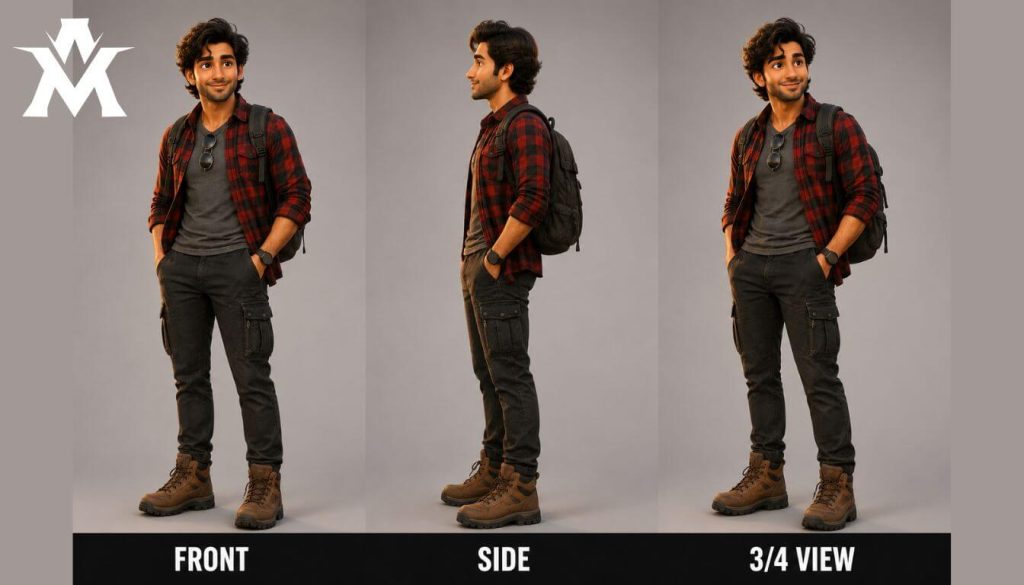
Character Prompt
Prompt:
Create a character reference collage of Burhan. Display the character in three perfectly consistent poses arranged horizontally: Front View, Side View, and 3/4 View, maintaining identical facial features, hairstyle, clothing, colors, proportions, and expression across all views. At the bottom, place matching bold labels reading "FRONT", "SIDE", and "3/4 VIEW" beneath each pose. Use soft professional animation studio lighting, global illumination, ambient occlusion, physically based rendering (PBR), Unreal Engine 5 quality.CHARACTER 4 COLLAGE – Ammar (Relaxed Friend)
Character Prompt
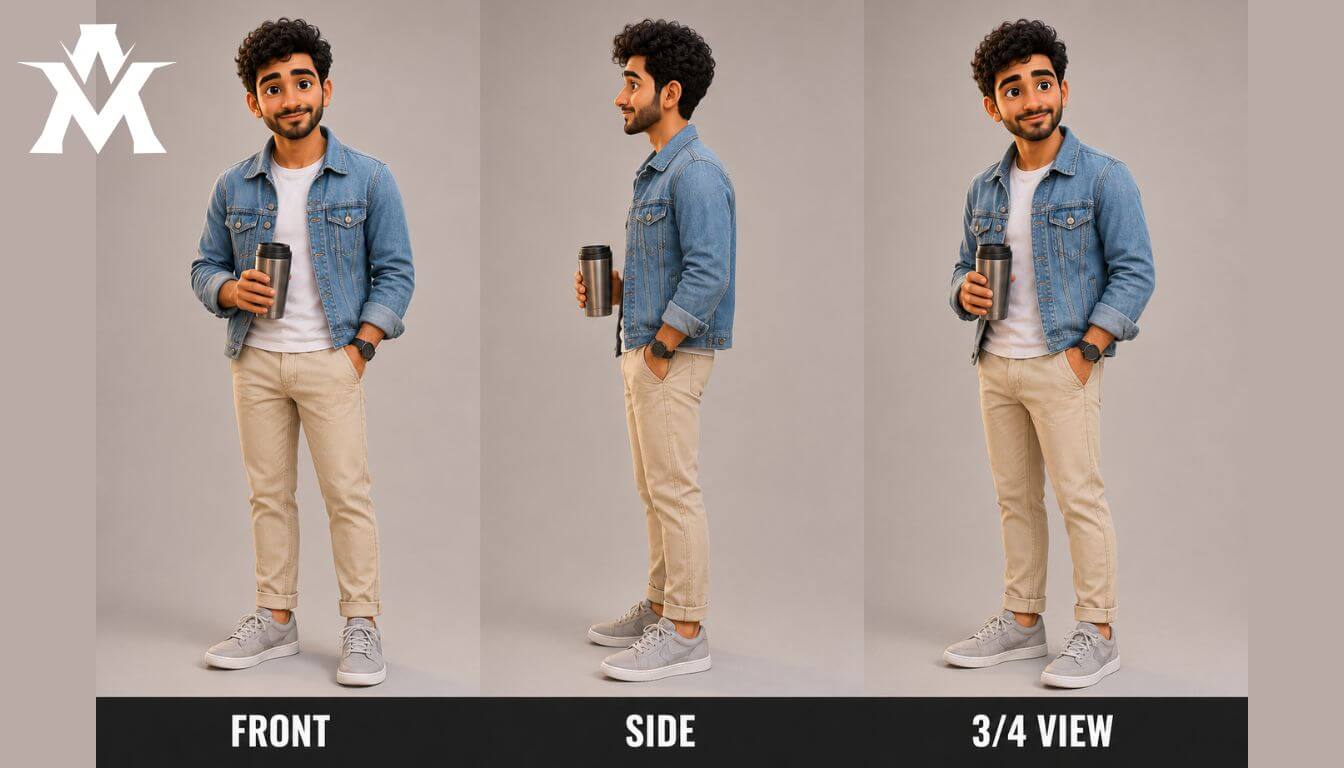
Prompt:
Create a character reference collage of Ammar. Display the character in three perfectly consistent poses arranged horizontally: Front View, Side View, and 3/4 View, maintaining identical facial features, hairstyle, clothing, colors, proportions, and expression across all views. At the bottom, place matching bold labels reading "FRONT", "SIDE", and "3/4 VIEW" beneath each pose. Use soft professional animation studio lighting, global illumination, ambient occlusion, physically based rendering (PBR), Unreal Engine 5 quality.Take these prompts and generate your base images. Save these collages—they are your master reference files.
Step 3: Setting Up Flow AI (Voice & Identity Lock)
Now that we have our character identities, we need to lock their voices so they sound identical in every scene.
-
Create a free account on Flow AI.
-
Go to the Characters tab and click Upload.
-
Upload the Master Reference Collages (Front, Side, 3/4 views) you generated for Taimoor, Bilal, Burhan, and Ammar.
-
Next to each character, select an AI Voice from the library. Test a few until you find the perfect match for their personality.
Now, the AI knows exactly what your characters look like from every angle, and exactly what they sound like.
Step 4: Generating Scene Images
Go back to ChatGPT and ask it to generate specific image prompts for the scenes:
“Give me image prompts for each scene of the road trip story.”
Copy the first scene’s prompt and paste it into Flow AI’s image generator.
Give me image prompts for each scenes-
Click the (+) sign and attach your Character Reference Collages.
-
Set the Aspect Ratio to 16:9.
-
Select the Nano Banana Pro model.
Hit enter. Because you attached the multi-angle collages, the resulting image will look incredibly cinematic, and the faces will be 100% accurate.
Now in the next step, we will convert these images into videos. And where will the prompts for making a video come from? i.e. ChatGPT will help us for that too. So for that, you will write a prompt here.
Step 5: Video Generation & Lip Syncing
This is where the magic happens. We will now turn those static scene images into moving video with synced dialogue.
Ask Your Ai model:
Give me video generations prompts for all the scenes with dialogues in [In Your Desire Language e.g: in Hindi]Inside Flow AI:
-
Paste the Video Prompt.
-
Click (+) and upload TWO things: The Character Collage AND the static scene image you just generated in Step 4.
-
Select Video, set the aspect ratio to 16:9, and choose the Flash Omni model (it uses fewer credits and delivers top-tier quality).
Because you already assigned voices to your characters in Step 3, Flow AI will automatically read the dialogue in your prompt, animate the character’s mouth perfectly to the words, and add motion to the scene.
Compiling the Final Video
You do not even need external software like Premiere Pro. In Flow AI, once Scene 1 is generated, click the “Add Clip” button right next to it and generate Scene 2. You can stitch the entire movie together inside the platform.
The Complete 20-Scene Asset Script
If you want to test this exact workflow right now, here is the complete generated prompt asset we used for the client project. Copy this into Flow AI to see the results:
Now this AI video is done,
VIDEO PROMPTS With Dialogues:
Scene 1 – Trip Begins
Video Prompt:
Early morning outside a modern house. The black Honda City is parked in the driveway. Taimoor loads luggage into the trunk while Bilal, Burhan, and Ammar bring backpacks and joke with each other. Birds are chirping, sunlight creates a warm glow. Camera starts with a wide establishing shot, then slowly dollies closer to the friends.
Dialogue (Roman Urdu):
Taimoor: “Bhai sab tayyar ho?”
Bilal: “Bas snacks reh gaye hain!”
Burhan: “Road trip officially shuru!”
Ammar: “Aaj sirf masti hi masti hogi!”
Scene 2 – Leaving the City
Video Prompt:
The friends get inside the black Honda City. Taimoor starts the engine. The camera follows the car leaving the neighborhood and entering the city roads with smooth cinematic tracking shots.
Dialogue:
Bilal: “Music full volume!”
Burhan: “Ab maza aayega.”
Ammar: “Seat belts laga lo.”
Sab: “Chaloooo!”
Scene 3 – Highway Drive
Video Prompt:
The Honda City cruises through a beautiful highway surrounded by green fields and mountains. Camera alternates between drone shots, hood-mounted shots, and interior shots where everyone sings happily.
Dialogue:
Bilal: “Yeh gaana repeat karo!”
Burhan: “Volume aur barhao!”
Ammar: “Safar abhi shuru hua hai.”
Sab mil kar gaana gaate hain.
Scene 4 – Funny Joke
Video Prompt:
Interior close-up. Bilal tells a funny joke. Everyone laughs uncontrollably. Camera cuts between facial reactions with slight handheld animation.
Dialogue:
Bilal: “Ek bandar taxi mein kyun gaya?”
Sab: “Kyun?”
Bilal: “Driver bhi bandar tha!”
Sab zor zor se haste hain.
Scene 5 – Scenic Highway
Video Prompt:
Wide aerial shots of the black Honda City driving through lush valleys, rivers, forests and mountains. Wind moves the grass naturally. Camera circles around the moving car.
Dialogue:
Burhan: “Yaar kitni khoobsurat jagah hai.”
Ammar: “Bilkul wallpaper jaisi.”
Scene 6 – Fresh Air
Video Prompt:
Windows open. The friends enjoy the cool breeze while smiling. Slow-motion shots of hands outside the windows and hair moving naturally.
Dialogue:
Bilal: “Yeh hawa hi alag feel de rahi hai.”
Taimoor: “Isi liye road trips best hoti hain.”
Scene 7 – Dhaba Stop
Video Prompt:
The black Honda City parks beside a traditional Pakistani highway dhaba. Steam rises from tea kettles. Camera follows the friends walking toward the tables.
Dialogue:
Burhan: “Chalo chai peete hain.”
Bilal: “Aur pakoray bhi!”
Sab haste hue baith jate hain.
Scene 8 – Tea Time
Video Prompt:
Close-up of steaming chai and crispy pakoras. Everyone laughs while drinking tea. Warm golden sunlight fills the dhaba.
Dialogue:
Ammar: “Yeh chai zabardast hai.”
Bilal: “Do cup aur lao!”
Sab hans dete hain.
Scene 9 – Photo Session
Video Prompt:
The friends take selfies beside the Honda City. Bilal uses his DSLR. Drone circles around the group while everyone poses.
Dialogue:
Bilal: “Smile!”
Sab: “Cheeeeeese!”
Burhan: “Ek aur photo.”
Scene 10 – Sunset Drive
Video Prompt:
Golden sunset. The Honda City drives through an empty highway. Lens flare, cinematic drone shots and smooth tracking.
Dialogue:
Ammar: “Yeh sunset yaad rahega.”
Taimoor: “Road trip ka best moment.”
Scene 11 – Mountain Viewpoint
Video Prompt:
The four friends stand at a mountain viewpoint enjoying breathtaking scenery. Wind moves their clothes. Camera slowly rotates around them.
Dialogue:
Burhan: “SubhanAllah kya view hai.”
Bilal: “Photo banti hai.”
Scene 12 – Drone Flying
Video Prompt:
Burhan launches a drone. Drone footage shows the Honda City parked with mountains behind it while everyone waves.
Dialogue:
Bilal: “Drone seedha rakh!”
Burhan: “Relax, professional hoon.”
Scene 13 – Hotel Arrival
Video Prompt:
Evening. The friends arrive at a cozy countryside hotel. Reception lights glow warmly. Camera follows them checking in.
Dialogue:
Taimoor: “Finally hotel aa gaya.”
Ammar: “Ab thora rest.”
Scene 14 – Dinner
Video Prompt:
Outdoor hotel restaurant under string lights. Friends enjoy dinner while laughing.
Dialogue:
Bilal: “Sab se pehle biryani.”
Burhan: “Aur BBQ bhi.”
Scene 15 – Game Night
Video Prompt:
Inside the hotel room. Friends sit on the floor playing Ludo and cards. Frequent laughter. Cozy atmosphere.
Dialogue:
Bilal: “Main jeet gaya!”
Ammar: “Cheating mat karo.”
Sab hans dete hain.
Scene 16 – New Morning
Video Prompt:
Beautiful sunrise outside the hotel. The friends load luggage into the Honda City and begin the second day of the trip.
Dialogue:
Taimoor: “Ready?”
Sab: “Always!”
Scene 17 – Second Tea Stop
Video Prompt:
A peaceful mountain tea stall. Steam rises from fresh chai while birds fly overhead.
Dialogue:
Burhan: “Ek aur chai ho jaye?”
Bilal: “Road trip chai ke bina adhuri hai.”
Scene 18 – Journey Home
Video Prompt:
The Honda City drives back through scenic roads. Interior shots show everyone smiling while remembering the trip.
Dialogue:
Ammar: “Yaar waqt kitni jaldi guzar gaya.”
Taimoor: “Phir chalenge.”
Scene 19 – Goodbye
Video Prompt:
The car reaches home. Everyone hugs each other beside the Honda City. Warm evening light creates an emotional atmosphere.
Dialogue:
Bilal: “Best trip ever.”
Burhan: “Next month phir chalte hain.”
Scene 20 – Ending Montage
Video Prompt:
Fast cinematic montage showing driving, laughter, chai, dhaba, hotel, selfies, mountains, sunsets, and friendship. Final shot: the black Honda City disappears into the glowing sunset while the camera slowly pulls upward into the sky.
Dialogue:
Ammar: “Safar khatam ho gaya…”
Taimoor: “Lekin yaadein hamesha rahengi.”
Sab: “Next road trip… jaldi!”
Final Thoughts
The days of needing an entire animation studio to create a 3D Pixar-style short are officially over. By leveraging reference collages for consistency and Flow AI for dialogue mapping, you can produce premium content for YouTube, TikTok, or client campaigns from a single laptop.
Stop generating random, inconsistent clips. Build a structured pipeline, lock your characters, and start directing.